If bottles of cannabis become contaminated or otherwise unfit for sale, follow the steps below to select and destroy the affected bottles.
Required permission(s): production_read, destruction_lot_read, bulk_lot_update
-
In the Productions module, select a production.
[img production-profile] -
Select a Bulk Lot. This opens the Bulk Lot's Profile.
[img bulk-lot-overview] -
Open the Destruction tab.
[img bulk-lot-destruction] -
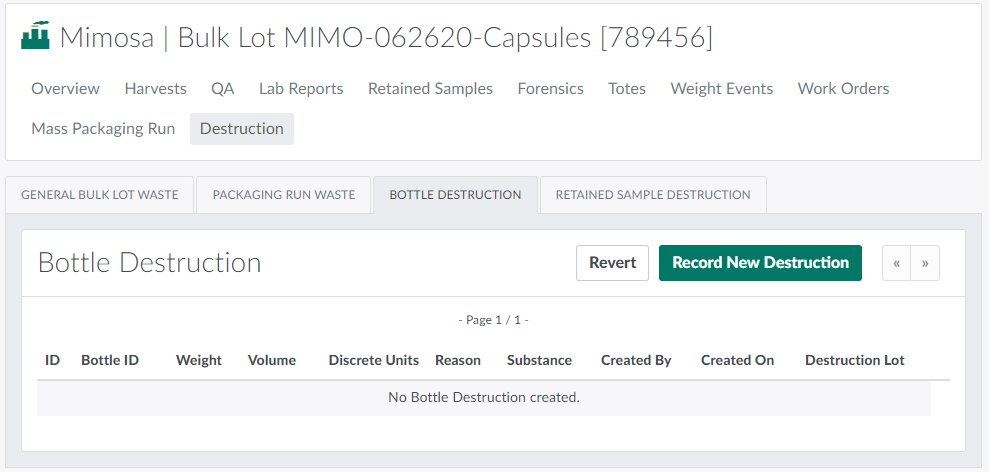
Open the Bottle Destruction sub-tab.
-
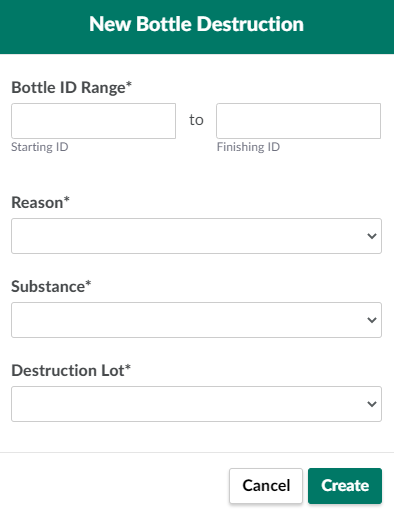
Click Record New Destruction to open the New Bottle Destruction modal.
-
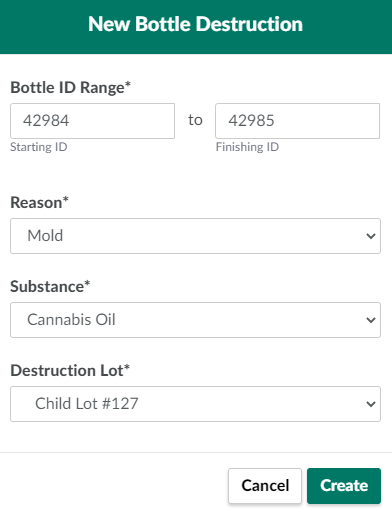
Enter information about the destruction in the fields provided.
-
Bottle ID Range: The range of bottle ID numbers to destroy. If only one bottle is affected, enter the same bottle number in both the Starting ID and Finishing ID fields.
-
Substance Destroyed: The substance to be destroyed.
- Visit the Destruction Settings tab to Add a Destruction Substance Type.
-
Destruction Reason: The reason for the destruction.
- Visit the Destruction Settings tab to Add a Destruction Reason Code.
-
Destruction Lot: The Destruction Lot and sublot that will house the destroyed material.
-
Visit the Destruction module to Create a New Destruction Lot or Sublot.
-
-
-
Click Create to destroy the bottle(s).

If an error occurs, Revert the Bottle Destruction.
The Destruction tab also allows QA Technicians to destroy General Bulk Lot Waste, Packaging Run Waste, and Retained Samples.