The Complaints module monitors and manages client-submitted or internal complaints. Opening the Complaints module brings you to the Complaints Dashboard.
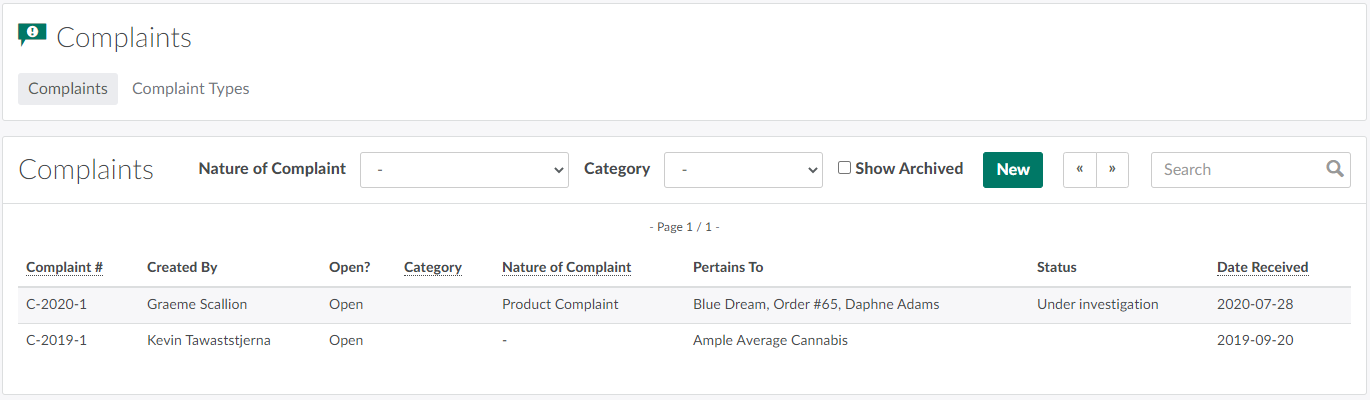
Dashboard
The Complaints Dashboard hosts a high-level index of all complaints saved to the licence holder's Seed-to-Sale environment. Sort this list using any one of several fields:
-
Complaint #: Sorts by complaint ID numbers.
-
Category: Sorts by complaint category.
- Visit the Complaint Types tab to Add a New Complaint Category.
-
Nature of Complaint: Sorts by complaint type.
- Visit the Complaint Types tab to Add a New Complaint Type.
-
Date Received: Sorts by the date at which complaints were received and recorded.

You can also filter the list using the options above the index. Select a complaint type from the Nature of Complaint drop-down menu to view only complaints of a specific type, or select a complaint category from the Category drop-down menu to view only complaints of a specific category. Click the Show Archived radio button to view archived complaints, or use the Search bar to enter specific search criteria.
To Record a Complaint, click New. Alternatively, visit the Complaints tab in a Client Profile or the Complaints tab in an Order Profile.
Select a complaint from the index to open the Complaint's Profile.
Open the Complaint Types tab to customize complaint type and complaint category options.