When a new client submits a registration form through a licence holder's website or a medical document through AmpleCare, this generates a new Client Profile in the Clients module. However, the licence holder's Customer Service Representatives–or CSRs–can manually add new clients.
Required permission(s): client_read, client_create
-
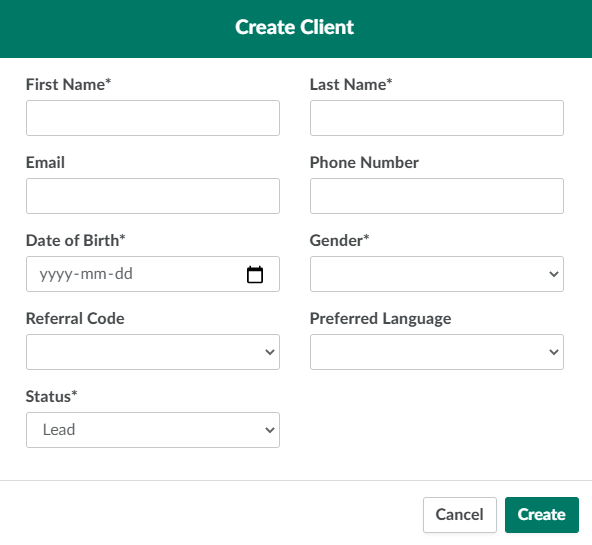
Open the Clients moduleand click New. This opens the Create Client modal.
-
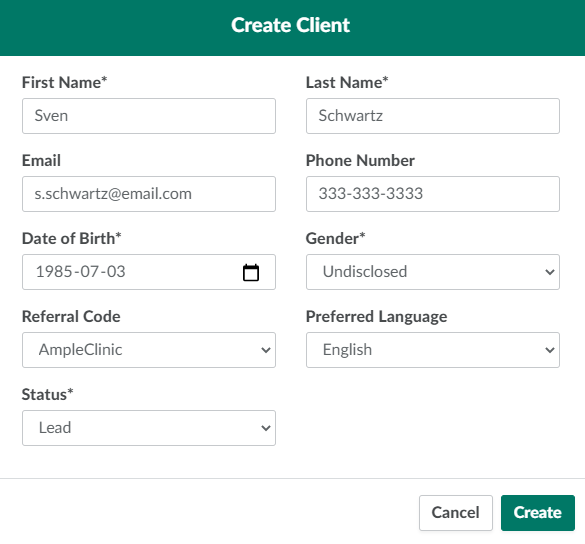
Enter information about the new client in the fields provided. Mandatory fields are marked with asterisks.
-
Click Create to add the new client. This creates a new Client Profile and assigns a unique 16-digit ID number to the client.
Before the client can place orders, a CSR must Add a Valid Prescription, Add the Client to a Sales Channel, and Approve a Client's Registration.
Adding a new client is the first step in the Client Registration Process.