The Weight Events tab in a Work Order Profile keeps a record of all weight changes resulting from the Work Order. Changes in weight occur when the Work Order receives input cannabis, when a Processing Technician finalizes the Work Order's output weights and waste, and when the output weight transfers to the destination Bulk Lot.
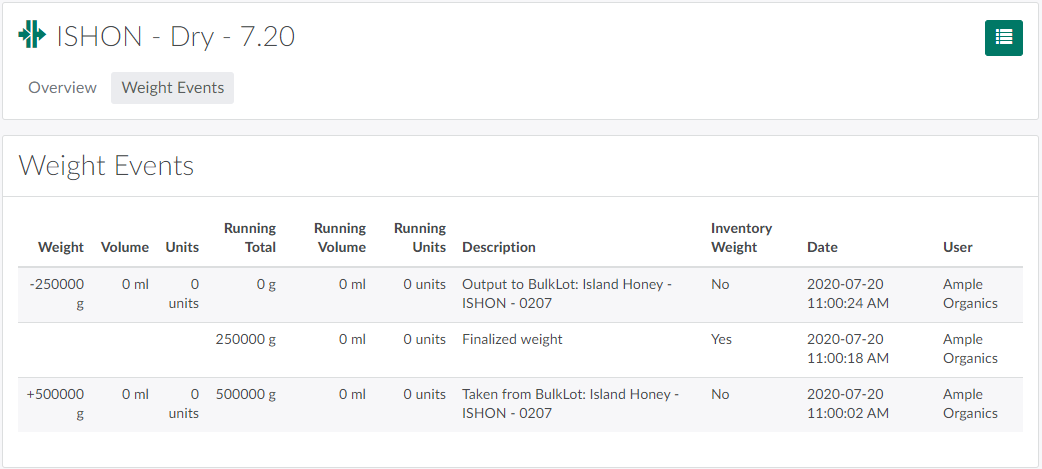
Each line in the Weight Events table includes detailed information about the Weight Event, including:
- Weight: The weight of cannabis affected by the Weight Event, in grams.
- Volume: The volume of cannabis affected by the Weight Event, in millilitres. This only applies if the Work Order's inputs or outputs are oil extract.
- Units: The discrete units affected by the Weight Event, if applicable.
- Running Total: The running total of the weight of cannabis being processed through the Work Order, in grams.
- Running Volume: The running total of the volume of cannabis being processed through the Work Order, in millilitres. This is only applicable if the Work Order's inputs or outputs are oil extract.
- Running Units: The running total of discrete units in the Work Order, if applicable.
- Description: A brief summary of the Weight Event.
- Inventory Weight: Indicates whether or not the Weight Event affects inventory weight.
- Date: The date on which the Weight Event took place.
- User: The user who performed the Weight Event.
Return to the Work Orders module to Create a New Work Order, or open the Overview tab to Finalize a Work Order or Close a Work Order.